I have an old Android phone in a drawer that would make a decent Home Assistant voice satellite. It has a screen, a microphone, Wi-Fi, and more computing power than the machines that sent people to the Moon. The annoying part is that it has to keep the big part of its processor awake just to hear two words: “Hey Nabu.”
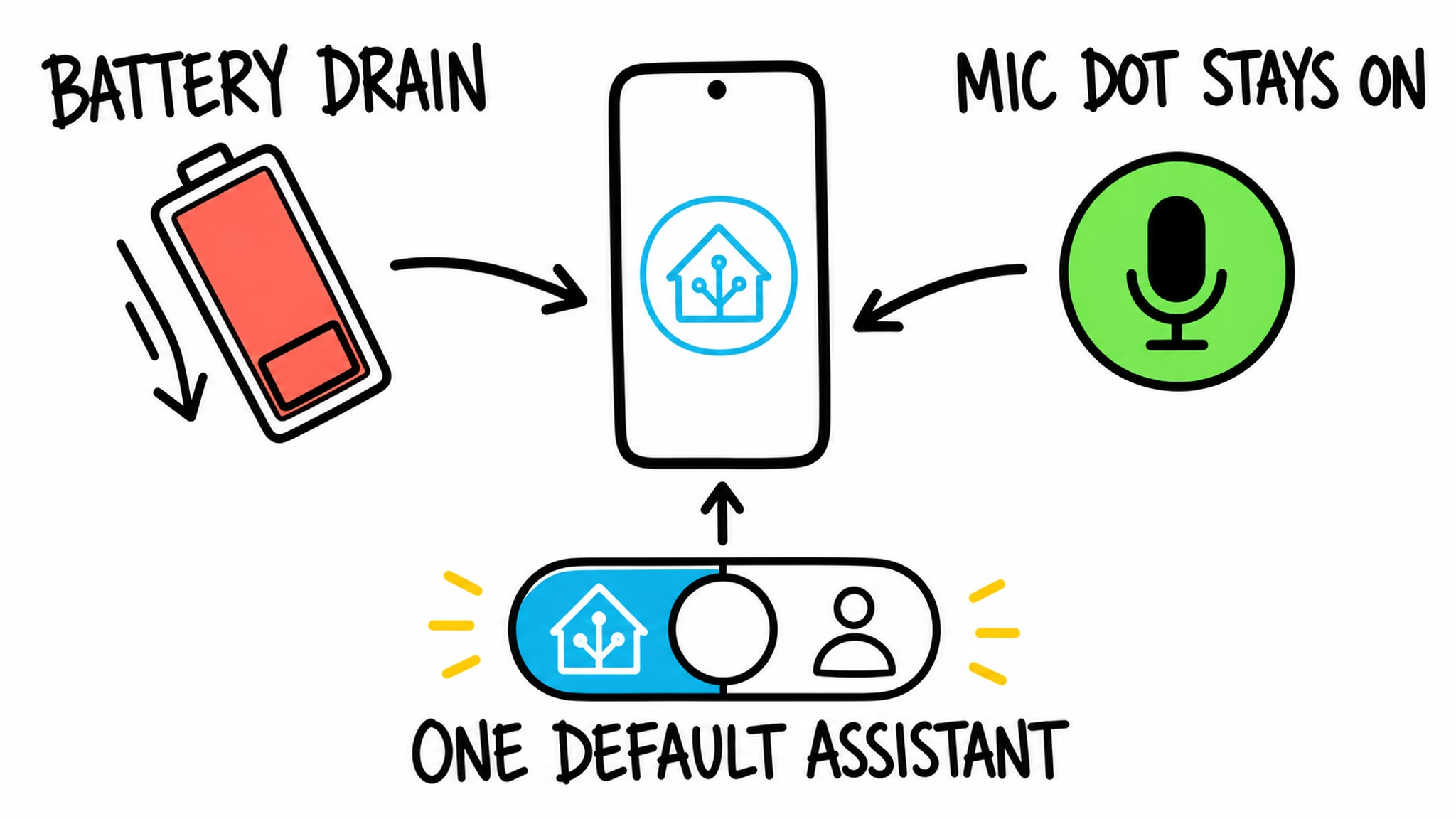
Home Assistant Android wake words already work. Since Home Assistant 2026.3, the Companion app can listen for a wake word on the phone, even while it is locked or in the background. I like the idea, but the current version comes with a few rough edges: higher battery use, the green microphone dot, and a choice between Home Assistant and your normal default phone assistant.
The European Commission has now told Google to open a much better Android path to third party AI assistants. That does not put a new feature on your phone tonight. It does mean the current Home Assistant Android wake words workaround could get far less awkward on newer phones, if Google and Home Assistant deliver the required pieces.
Table of Contents
Get the free Android wake-word PDF
I put the complete setup, the home-only battery-saving idea, the real deadlines, and the limits in a free Android wake-word PDF. The article gives you the picture. The PDF is the thing I would keep open beside the phone while setting it up.
To get the PDF, type your name and e-mail. You will receive an e-mail from me to confirm you are not a robot, and the PDF will be sent to your inbox. You will also be subscribed to my newsletter where I share new content, updates, and my exclusive AI and Home Assistant challenge. It is free, and you can unsubscribe anytime with one click.
The useful part that already works
Home Assistant added experimental on-device wake-word detection to its Android Companion app in Home Assistant 2026.3. You can lock your phone, say “Hey Nabu,” “Hey Jarvis,” or “Hey Mycroft,” and open Assist without touching the screen. The wake-word check happens on the phone, so your audio is not sent to Home Assistant until the wake word is detected.
That last line needs one small warning. Local wake-word detection does not automatically mean every spoken request stays local. Once Assist opens, your request uses the Assist pipeline you configured. That can be fully local, or it can use a cloud speech service. The wake word is only the front door.
For a quick current setup, the phone needs Companion App 2026.2.3 or newer, a working Assist pipeline, and Home Assistant set as its default digital assistant. In the app, go to Settings → Companion app → Assist for Android, turn on wake-word detection, pick a wake word, then lock the phone and try a harmless command. The official Home Assistant Android voice-control documentation has the current requirements and wording.
Tired of reading?
Watch the Android wake words video here. I show the current phone setup, explain why the DSP matters, and put the 2027 and 2028 deadlines in the right order. The video also has the drawer-of-retired-Androids problem that some of us have somehow turned into a lifestyle.
If you only take one thing from this, make it this: the feature works today, but the efficient version is still a future Android and Home Assistant job. That makes it worth testing now without pretending your phone received a magic EU update overnight.
Why today’s Android wake words can drain battery
A wake word is a tiny job. The phone only needs to listen for a short sound pattern, then wake the rest of the system after it hears a possible match. Many phones have a low-power digital signal processor, or DSP, for exactly this kind of always-listening work. Think of it as a tiny ear that can stay awake without waking the big brain.
Google’s own wake-word path can use that low-power hardware. The current Home Assistant workaround runs microWakeWord on the main CPU instead. It works, but it is like leaving a truck idling so it can hear a doorbell. The Open Home Foundation reported one example where battery use rose from roughly 1% to roughly 15% with wake-word detection enabled. That is not a promise about every phone or every testing window. It is still a good reason to watch your battery before leaving the feature on all day.
The current method also needs ongoing microphone access, which is why the green privacy dot can remain visible. And Home Assistant needs the default-assistant role to keep the service alive through reboots. You cannot keep Gemini as the default assistant at the same time. Those limits are the interesting part of the new decision.
What Google must open
On July 16, 2026, the European Commission adopted binding Digital Markets Act measures for Alphabet’s Android AI interoperability. The decision covers eleven kinds of access for third party AI services. Always-on Android wake words are one of them.
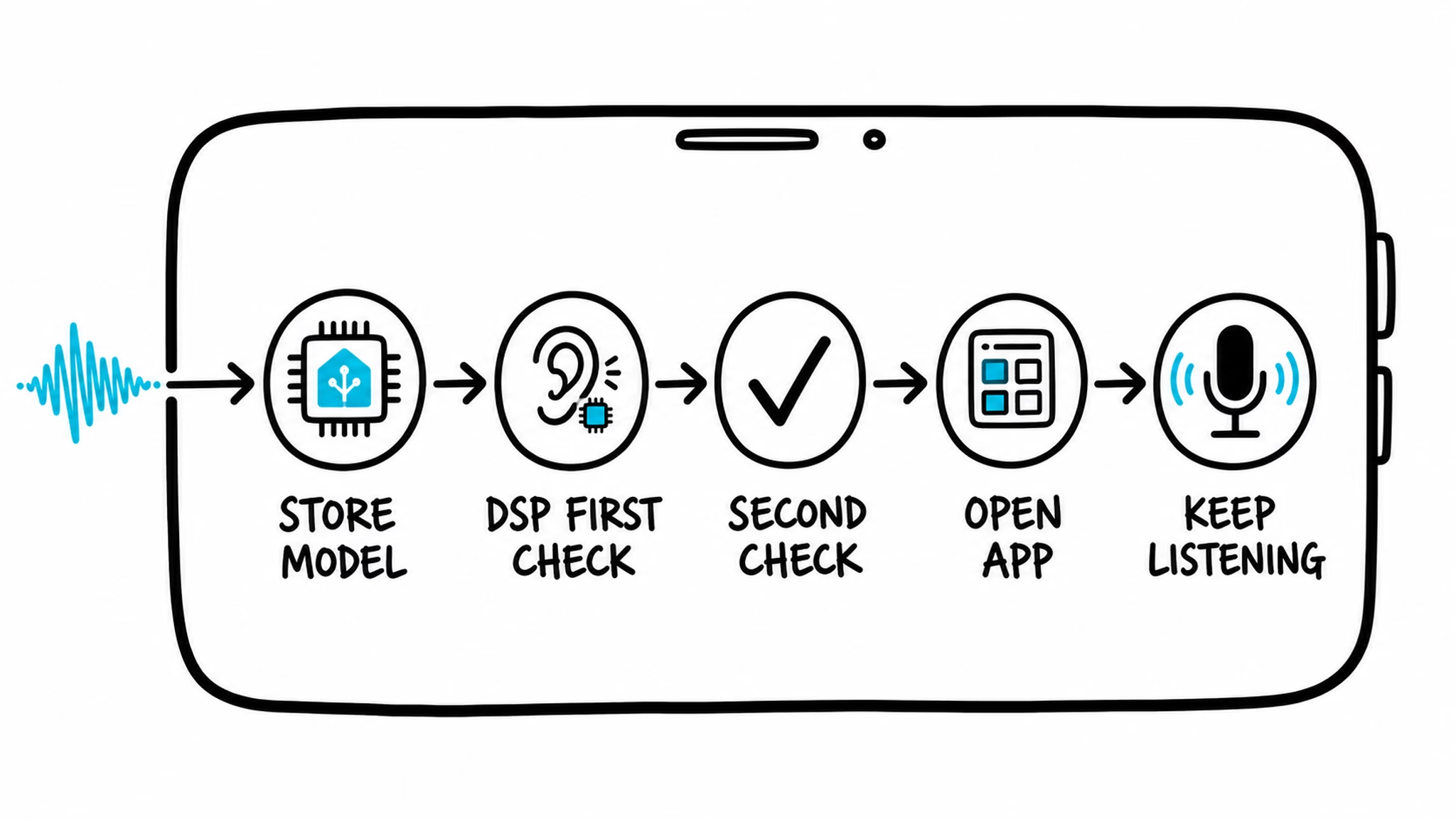
For Android wake words, Google must provide a way for another assistant to add its own sound model and, where the phone supports it, use the low-power DSP for the first check. Android can then perform a second check, open the right app, and keep audio available long enough for the user to speak the real request. The Commission says the access must be free for developers and equally effective to Google’s own path for setup, speed, stability, and energy use. “Free” here means Google’s interoperability access, documentation, testing, and technical help. It does not make Home Assistant Cloud or every voice service free.
This does not mean Google hands its “Hey Google” model to Home Assistant. A third party assistant brings its own model. It also does not mean an app can grab sensitive phone access without safeguards. The measures still allow clear consent, privacy indicators, per-service controls, and fair safety or certification rules for sensitive areas. The rule is that Google has to meet the same standards it asks of everyone else.
The European Commission’s Android AI interoperability announcement is worth a read if you want the official version without my tiny-ear drawing. The Open Home Foundation’s explanation is especially useful for the Home Assistant angle.
The dates matter more than the headline
Most of the required Android wake words access is due with Android 18, no later than August 1, 2027. The part where more than one assistant can listen at the same time is due with Android 19, no later than August 1, 2028. In plain English, “Hey Nabu” and “Hey Google” listening side by side is a later goal, not a 2026 trick.
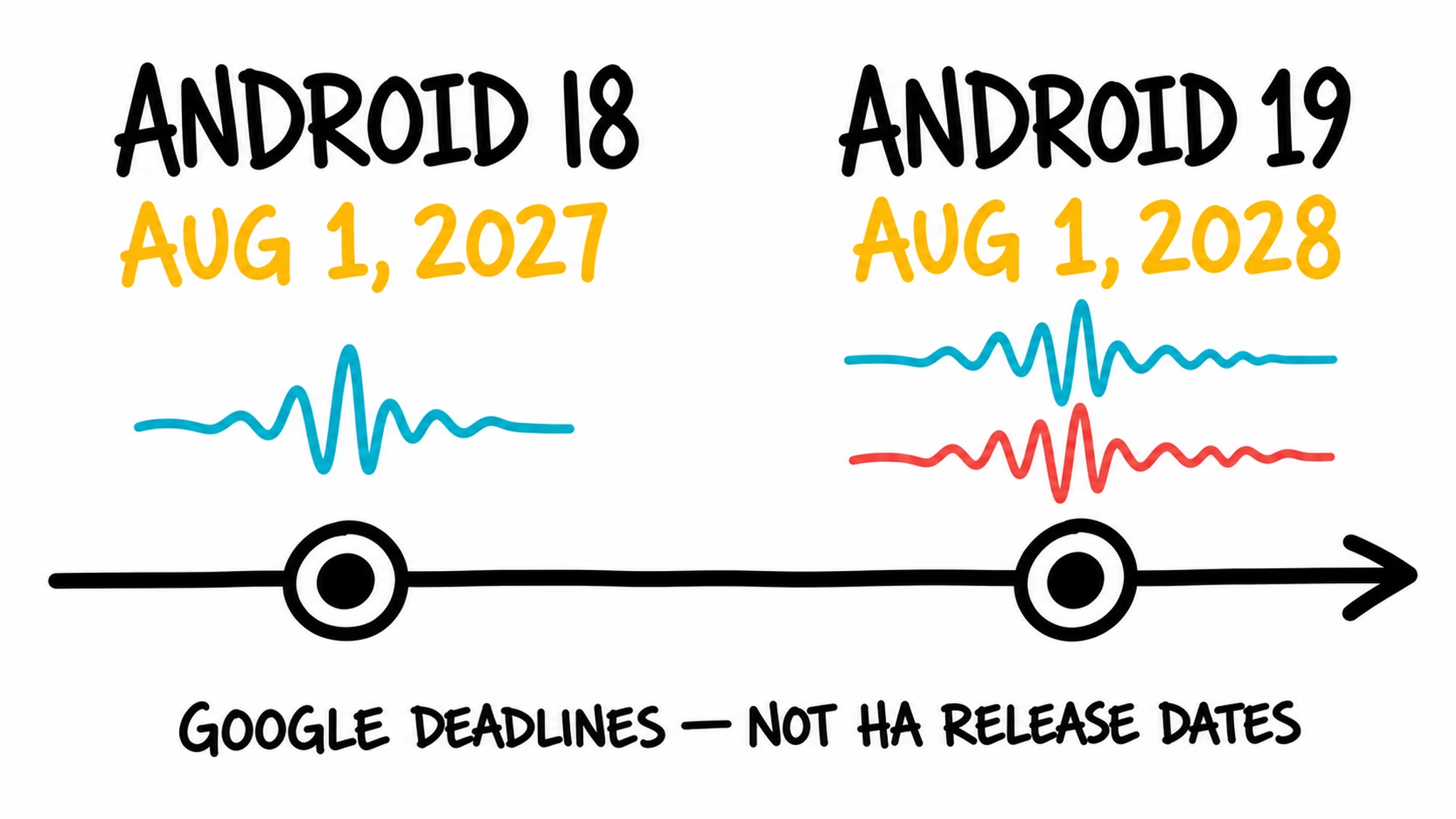
There are a few more brakes on the hype train. This is an EU Digital Markets Act decision. The public material does not promise an identical worldwide rollout on the same day. It applies to covered Google-certified, Google Play-supported Android devices when the feature exists and the phone still receives the needed update. A law cannot add a DSP to the old phone in your drawer, sadly. That phone may keep using the CPU-based route, if it supports the current feature at all.
Home Assistant also has to decide what it wants to build, write the code, test it on real phones, and ship it. The Open Home Foundation has talked about better battery life, less need for the default-assistant role, stronger privacy designs, and eventually two assistants on one device. Those are useful possibilities, not a Home Assistant roadmap promise.
What I would do with Android wake words today
I would test Home Assistant Android wake words at home first. Use a quiet, harmless command such as turning on a lamp. Lock the phone, say the wake word, and see whether Assist opens consistently. Then check the battery later instead of finding out at 6 p.m. that the phone has been working harder than you were.
If battery use is too high, Home Assistant can control the feature remotely with the command_wake_word_detection notification command. A practical automation can turn listening on when the phone joins your home Wi-Fi and turn it off when you leave. You get hands-free Assist where it is most useful without asking the phone to listen in the office, the car, or while you are arguing with a bag of potatoes at the supermarket.
If you want more Home Assistant ideas
Browse my Home Assistant articles for practical setup guides, voice ideas, automations, and upgrades that are worth trying. If you are following the stranger AI side of the smart home, my AI articles are there too. I try to keep the useful experiments and the slightly weird ones in the same place.