

ha-mcp is the part that made this whole Codex and Home Assistant experiment feel different.
Without it, Codex can still write YAML examples. It can explain dashboards. It can suggest automation ideas. Nice, but also a bit detached from the real mess inside my Home Assistant.
With ha-mcp, Codex can ask Home Assistant what is actually there. Real entities. Real automations. Real dashboards. Real traces. That is where it stops feeling like a generic chatbot and starts feeling like a smart assistant sitting next to the dashboard editor.
And yes, that is exciting. It is also the kind of exciting where I want a backup before I click anything important.
I tested this because my previous video about Claude, Home Assistant, and ha-mcp did very well. People watched it, tried it, and then a very fair question appeared in the comments: can I use something else than Claude?
That question made sense. Claude worked nicely in my first test, but I was using the free tier and I hit usage limits very fast. Waiting for the reset is not the end of the world, but when you are in the middle of a Home Assistant rabbit hole, it feels like somebody locked the toolbox.
I already pay for OpenAI Plus, so I wanted to test Codex with ha-mcp. Not for a theory video. For the things Home Assistant users actually do: build dashboard cards, create automations, and debug the old automations that everyone pretends they will clean up one day.
Table of Contents
Tired of reading?
I also made a video version of this experiment. You can watch it here: Codex, ha-mcp, and Home Assistant video.
The video is better if you want to see the flow visually: Codex, the MCP bridge, dashboards, automation prompts, and the safety checks before approving changes.
The simple idea: Codex gets Home Assistant tools
The basic structure is simple. Home Assistant is your smart home. Codex is the AI assistant. ha-mcp is the bridge between them.
MCP means Model Context Protocol. The less fancy explanation is this: it gives an AI assistant tools it can use. Instead of guessing what your entities are called, Codex can ask Home Assistant. Instead of giving a random automation example, it can inspect the current automation first, then suggest a safer fix.
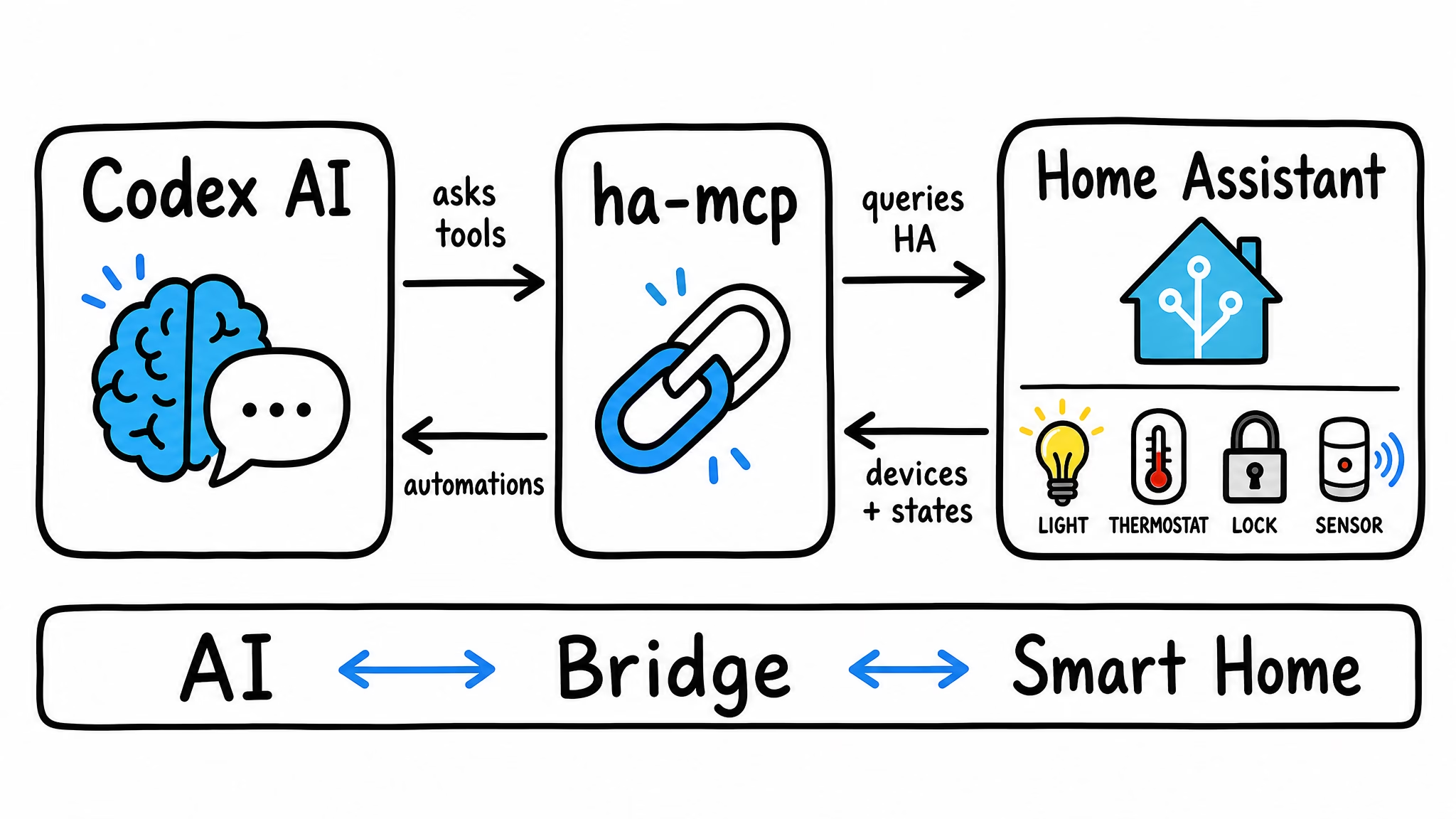
The official ha-mcp GitHub page shows examples like adding dashboard cards, debugging a motion sensor automation, and creating scripts. That is the interesting part. This is not only “AI, explain Home Assistant.” It is closer to “AI, look at my Home Assistant and help me build the thing.”
Of course, I do not want Codex to behave like a cowboy with Wi-Fi. So my rule is simple: plan first, change later. For early tests I prefer safe devices, dashboards, read-only inspection, and test environments where possible. I do not start with locks, alarms, garage doors, or water valves. Smart bulbs are brave enough for day one.
Do you know that you can get a real Free HA & AI book?
I put more than 1,000 hours within 6 months on this project and I managed to develop a tool and describe in great details several real-life AI recipes. I put everything in a book called Home Assistant AI Recipes and it is your to have for free you just have to cover printing & shipping. But check this page for more info – https://peyanski.com/ha-mcp-codex-home-assistant-dashboards-automations/
Dashboard cards are where this becomes useful fast
The first use case I like is dashboard creation. Every Home Assistant user knows this small pain. You want one clean card, but first you have to remember the entity names, choose the right card type, make it readable on mobile, and avoid turning a simple dashboard into a tiny airplane cockpit.
With ha-mcp, Codex can help with the boring first part. A prompt can be very normal:
Look at my Home Assistant entities and help me create a House Check dashboard card. I want garage door, front door lock, open windows, motion, temperature, and low batteries. Make it simple for a phone. Before changing anything, show me the entities you plan to use.
That last sentence is the important one. Before changing anything, show me the entities you plan to use.
Maybe Codex finds three motion sensors. Maybe two door locks. Maybe a battery entity with a name from five years ago when I apparently named devices by dropping the keyboard on the floor. This is why I want a plan first.
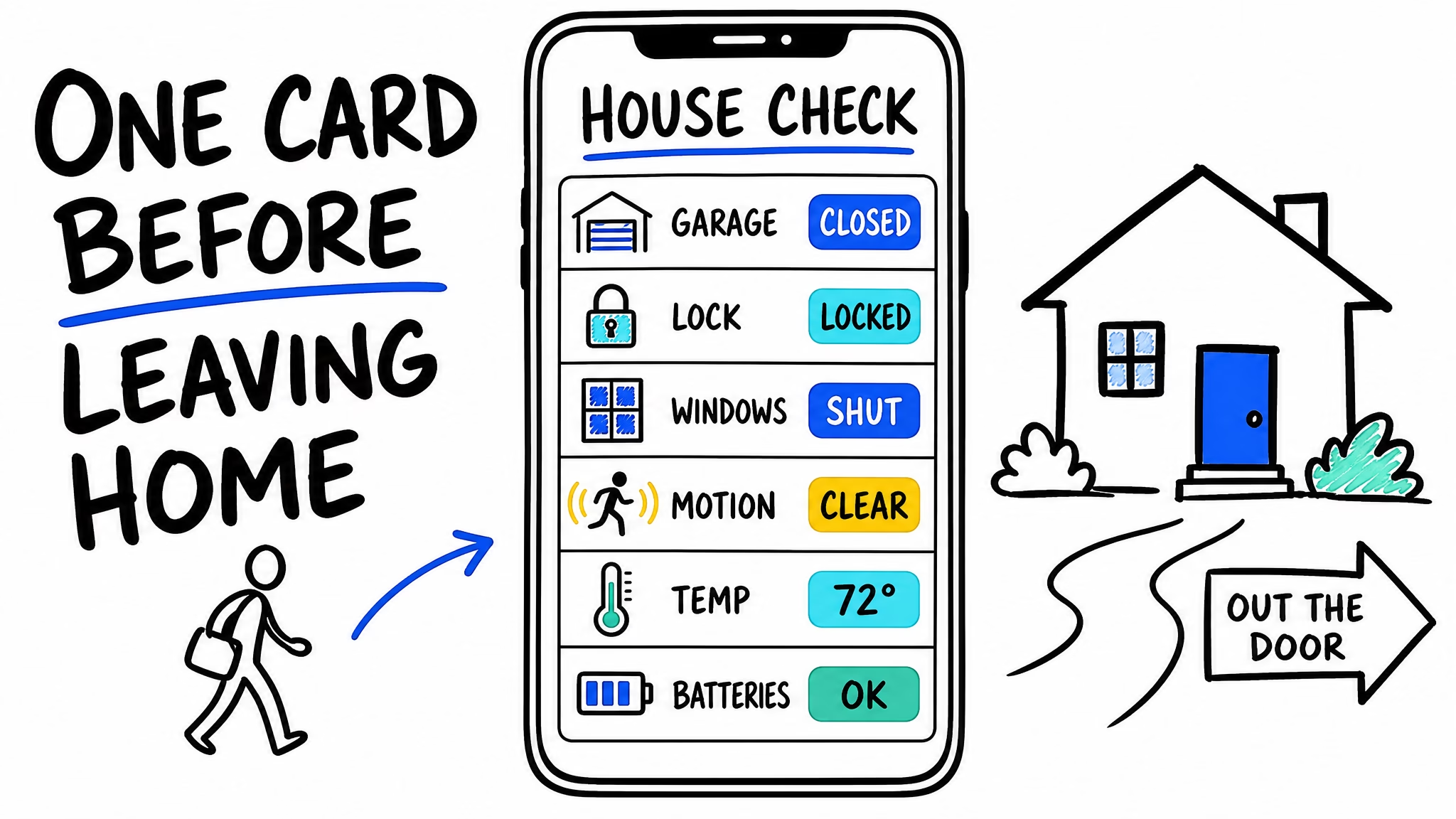
The workflow I like is not “AI does everything and I hope my house survives.” It is idea, AI search, AI first draft, human review, then Home Assistant result. Codex can reduce the friction, but I keep the steering wheel.
Automation creation still needs a human brake pedal
The second useful area is automation creation. This is where ha-mcp can save time because automations often need several pieces to work together: triggers, conditions, services, helpers, entity states, maybe time windows, maybe a notification.
For example, a simple bedroom automation can still become annoying by hand. Motion at night should turn on a soft light. A cold room with an open window should warn you. Blinds should open in the morning, but not at 4:30 because some automation got too enthusiastic. These are normal smart home ideas, but they include enough small logic choices to slow you down.
So I would ask Codex for a plan first:
Create a Sleep Rescue automation plan for the bedroom. Use motion, window contact, temperature, lights, and blinds if they exist. Do not write changes yet. Show the plan first.
Then I can review the trigger, condition, action, and mode. Should it be single, restart, or queued? Should it be one automation or two? Should there be a helper? Codex can suggest an answer, but Home Assistant is still my home, not a code playground.
This is also why ha-mcp feels more useful than copying a YAML block from a normal chatbot. The AI can work from the real environment, but you can still force it to slow down and explain what it wants to do.
Debugging old automations may be the best use case
Creating new automations is fun. Debugging old automations may be more valuable.
Every Home Assistant user eventually has an automation graveyard. Old names. Old devices. Old logic. One automation called something like “test final fixed real final 2” and nobody wants to ask what happened there.
This is where I would use ha-mcp in a very safe way:
Look at my automation called Bedroom Night Light. Do not change it. Explain what it does in simple words. Then check why it may not be triggering. Use traces or history if available. Give me the safest fix first.
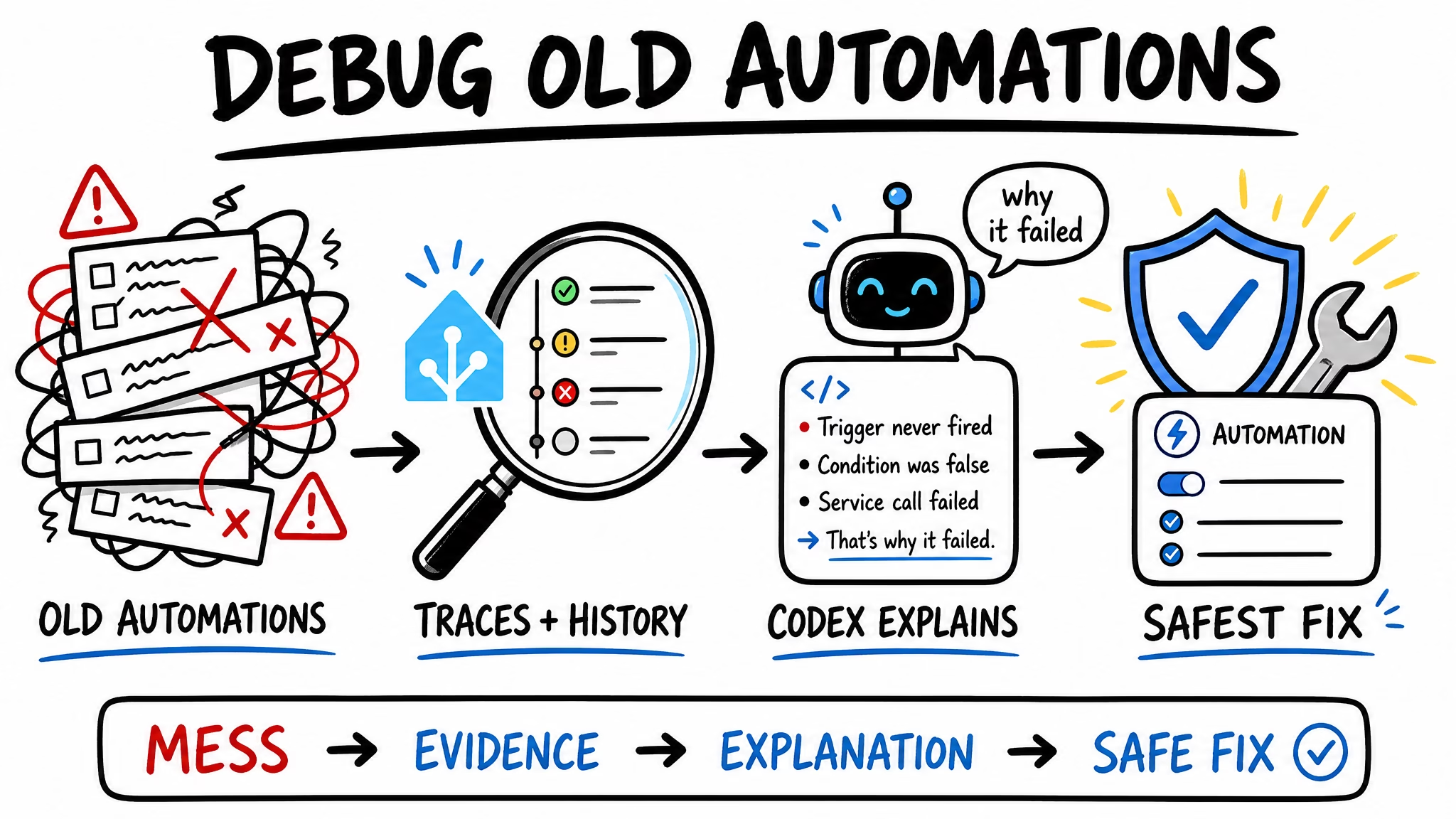
That is a very different request from “fix it.” I want Codex to explain first. If the condition never becomes true, tell me. If an entity was renamed, show me. If the trace points to the wrong branch, explain it. Then I decide if the fix makes sense.
AI being wrong is annoying. AI being wrong inside your real home at 2 AM is a different flavor of annoying. I prefer the first one.
The PDF has the Mac and Windows setup details
I did not want the video or this article to become a full install marathon. The setup details matter, especially on Mac and Windows, but they can also eat the whole topic if I let them.
If you want the full setup path for Codex, ha-mcp, and Home Assistant, I made a PDF here: Codex + ha-mcp + Home Assistant PDF guide.
The PDF covers the Mac and Windows setup flow, the Home Assistant connection, token notes, Codex config notes, the local stdio option with uvx, and the safety checklist I would use before letting any AI assistant touch a real smart home.
To get the PDF, type your name and e-mail. You will receive an e-mail from me to confirm you are not a robot, and the PDF will be sent to your inbox. You’ll also be subscribed to my newsletter where I share new content, updates, and my exclusive AI and HA challenge. It’s free and you can unsubscribe anytime with one click.
Now back to the practical part, because there is one setup detail that explains why I separated the guide from the demo.
One Codex detail that can save time
The ha-mcp setup wizard lists Codex as one of the supported clients. It also lists many others: Claude Desktop, Claude Code, Cursor, VS Code, GitHub Copilot Agents, Windsurf, Cline, ChatGPT, Gemini CLI, Open WebUI, OpenCode, Antigravity, and more.
That is the bigger lesson from this test. ha-mcp is not only a Claude thing. The bridge is the important part. Different AI clients can walk over the bridge.
But the path can be different depending on the client. The FAQ mentions an important Codex caveat: for HTTP native clients, Codex can connect to an add-on URL, but there has been a known Codex HTTP MCP initialization bug where no tools load. If that happens, the workaround is to run ha-mcp locally over stdio with uvx instead.
This is the kind of tiny detail that can steal an afternoon. One computer says “uvx not found,” another hides a config file, and suddenly the smart home is fine but the human needs a snack.
My safety rules for Codex and ha-mcp
My current rules are boring, which is exactly why I like them.
- Ask Codex to show the entities before it builds anything.
- Ask for the plan before it writes changes.
- Start with dashboards, lights, and read-only inspection.
- Avoid locks, alarms, garage doors, and water valves in early tests.
- Make a backup before testing bigger changes.
- Do not approve a change you do not understand.
If you follow those rules, Codex plus ha-mcp can be a very useful helper. If you ignore them, congratulations, you have invented gambling with smart bulbs.
One prompt I think almost every Home Assistant user should try after setup is this:
Give me a simple overview of my Home Assistant. List the main areas, important devices, automations, and anything that looks confusing or badly named. Do not change anything.
It is not flashy, but it is useful. Before AI builds anything, it should understand your home. Honestly, before I build anything, maybe I should understand my home too.
So, is Codex worth testing with Home Assistant?
My current answer is yes, especially if you are already in the OpenAI world and you want help with dashboards, cards, automations, scripts, and debugging.
The old Claude test showed that AI plus ha-mcp can be scary good. This Codex test shows the idea is bigger than one AI app. The model matters, but the bridge matters more.
I would not treat Codex like a magic Home Assistant admin. I would treat it like a fast assistant that needs boundaries. It can find the boring details. It can draft the card. It can explain the automation. It can point at the broken condition. Then you decide.
That is the version of AI in the smart home that I actually like. You describe what you want. Codex uses ha-mcp to get the real Home Assistant context. You review the result. Your home gets a little easier to manage without you fighting entity names until midnight.
If you want more
If you want more simple smart home experiments like this, check my Home Assistant articles and my AI articles.
And if you want the setup steps instead of the story version, grab the Codex + ha-mcp + Home Assistant PDF guide. It will not stop your smart home from developing opinions, but at least it can help you connect the pieces without guessing every path.