

What is Home Assistant Solar Forecast? I used to do this weird thing every morning.
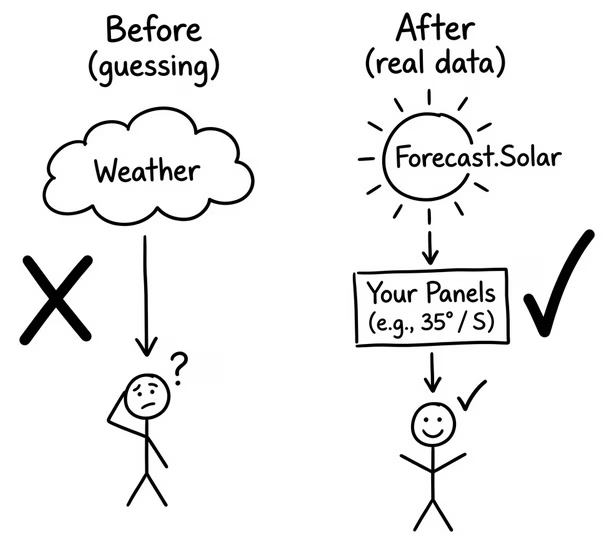
I’d check the weather, look at the cloud coverage, glance at the UV index, and try to guess how my solar panels would do today. Sunny? Probably good. Overcast? Probably not great.
That was my entire “solar forecasting strategy.” And honestly? It was terrible. 😅
The weather forecast gives you temperature, UV index, and cloud coverage — and that’s about it. None of those numbers actually tell you how many kilowatt-hours your panels will produce today. You’re basically guessing. And guessing with solar panels is like guessing how much gas is in your car — you’ll be fine until you’re not.
Then I found something that completely changed the game.
Table of Contents
Discovering Forecast.Solar in Home Assistant ☀️
I’ve been running Home Assistant for a while now, and I’m always looking for useful integrations. One day (not so long ago) I came across Forecast.Solar — a free service that gives you actual solar production forecasts based on YOUR specific panel setup.
Not generic weather data. Not “it’ll be sunny.” Actual numbers — in watts and kilowatt-hours — for YOUR panels, YOUR roof angle, YOUR direction.
The Home Assistant solar forecast data you get is pretty detailed:
- How much total energy your panels should produce today (in kWh)
- How much they’ll produce tomorrow
- What time the peak production will be
- How much power they’re making right now
- How much energy you’ll get in the next hour
That’s real, useful data. The kind you can actually make decisions with — like “Should I charge the car this afternoon?” or “Is it a good day to run the washing machine?”
But here’s the thing — I have three groups of solar panels. East, West, and South. Three different directions, three different sets of numbers. Looking at all of this raw data every morning was… a lot.
So I did what I always do when there’s too many numbers and not enough clarity.
I Let AI Handle It 🤖
I built a Home Assistant solar forecast automation that does something really simple but really useful:
- Every morning at 8 AM, it grabs ALL my solar forecast data
- It combines the numbers from all three panel groups into totals
- It sends everything to an AI
- The AI writes a short, friendly summary
- I get a notification on my dashboard
The result looks something like:
“Great day for solar! Your panels should make about 38 kilowatt-hours today. Best time will be around 1 in the afternoon. Plenty of energy to charge the car and run the heavy appliances!”
No charts. No math. No guessing. Just a clear morning briefing about my solar panels — written by AI, in words a kid could understand.
And the best part? It runs automatically. I don’t have to do anything. I just open Home Assistant and the notification is already there waiting for me. ☀️
Why This Is So Much Better Than Weather-Based Guessing
I want to stress this because it was a real “aha” moment for me.
Before, I relied on the weather forecast. UV index, temperature, cloud coverage. That’s what I had. And while those things do affect solar production — they don’t paint the full picture.
The Home Assistant solar forecast integration from Forecast.Solar is different because you actually configure YOUR solar system:
- The angle (tilt) of your panels
- The direction they face
- The total watt peak of all your panels
- Even the inverter size if it’s smaller than your panel capacity
Forecast.Solar takes all of that, combines it with weather predictions and historical data, and gives you a forecast that’s genuinely accurate. Not “it’ll maybe be sunny” — but “you’ll produce approximately 38.4 kWh today.”
That’s a huge difference when you’re trying to plan your energy usage.
What About Multiple Panel Groups?
This is where it gets a little more interesting.
Many people (like me) have solar panels on different parts of their roof — facing different directions with different angles.
The Home Assistant solar forecast integration handles this beautifully. You just add it once for each group. I have three — East, West, and South — so I added it three times. Then I created a few template sensors that add up the totals from all three groups. So instead of looking at three separate “energy today” numbers, I just see one total.
If you have just one group of panels — you don’t need template sensors at all. But if you’re in the multi-group club like me, the full instructions for creating those templates are in the PDF guide (more on that below).
The Automation Itself
Without going into all the code details, here’s the structure:
- Trigger: Time-based — runs at 8:00 AM every morning.
- What it reads: Total energy production today, tomorrow, power right now, peak time, and energy for the next hour.
- What it does: Sends all of that to an AI (through the Ollama-HA app) and asks it to write a simple summary.
- What you get: A persistent notification on your Home Assistant dashboard with the AI-written summary.
The whole automation is a single YAML file. You paste it in, change a few sensor names to match yours, and you’re done.
📥 Want the Full Step-by-Step Instructions? Get the Free PDF
I put together a detailed PDF guide that walks you through the entire setup — from adding the Home Assistant solar forecast integration to testing the final notification.
Here’s what’s inside:
- ✅ How to add Forecast.Solar and configure your panel setup
- ✅ How to create template sensors for multiple panel groups
- ✅ How to set up the AI Task with the Ollama-HA app
- ✅ The complete automation YAML code
- ✅ How to adapt everything to YOUR sensors
- ✅ Troubleshooting tips for common issues
- ✅ Recall diagrams that make the concepts click instantly
- ✅ A 10-question quiz to test what you learned
👉 Download it here: automatelike.pro/solar-forecast
Here’s how it works — just enter your name and email on the page. You’ll get a quick confirmation email from me — just click the link to verify you’re a real person and not a robot pretending to care about solar forecasts 🤖. Once confirmed, the PDF goes straight to your inbox.
You’ll also be subscribed to my free newsletter where I share new Home Assistant content, automation ideas, and updates. And right now there’s something special going on — I’m running an AI & Home Assistant Challenge with live lessons that’s exclusive for newsletter subscribers. All the details drop once you sign up — you literally can’t find them anywhere else. It’s kind of like a secret AI & HA club. ☀️🤫
And if the newsletter isn’t your thing — totally cool. You can unsubscribe anytime with one single click. No weird confirmation pages, no guilt, no “are you sure?” popups. Just a clean goodbye.
But honestly? Most people stick around. The content is pretty good. 😊
🎥 Prefer Watching? Here’s the Video
Tired of reading? I totally get it. I made a YouTube video where I build this whole thing live and explain everything as I go:
👉 Watch the video on YouTube
It’s a visual walkthrough — You can follow along or just watch and grab the PDF later for the details.
Why I Actually Use This Every Day
Here’s the honest truth — I have a lot of automations in my Home Assistant. Some of them are cool to show off. Some of them are useful once in a while.
This one? I actually look/hear at it every single morning.
The Home Assistant solar forecast notification has become part of my routine. I check it with my coffee and I know right away: is today a good day to charge the car? Should I run the heavy appliances now or wait until the peak? Do I need to be smart about energy today or can I be lazy?
It sounds simple — and it is. That’s what makes it great.
Before I Found This, I Was Just Guessing
I keep coming back to this because it’s so true. I was always curious about how much my panels were actually making versus what they could make. But I never really knew — because all I had was the weather and some rough math in my head.
The Home Assistant solar forecast approach changed that completely. Now I have real numbers, real predictions, and an AI that explains it all to me like I’m a friend asking a simple question.
If you have solar panels and you use Home Assistant — this is one of those setups that’ll make you think: “Why didn’t I do this sooner?”
📥 Grab the Free PDF and Start Building
Everything you need is in the guide:
👉 automatelike.pro/solar-forecast
Enter your name and email, confirm you’re not a robot, and the full Home Assistant solar forecast PDF lands in your inbox in minutes.
Happy automating — and enjoy that free energy! ☀️
P.S. Don’t forget to check my other AI & HA articles 👉 Here!