

The Home Assistant Sun integration is built into every HA installation — 99.6% of users already have it running. But most people only use it for basic sunrise and sunset triggers.
There’s way more hiding inside. ☀️
Tomorrow I’m going live to show you how to turn all that Sun data into a fun AI-powered morning notification — and I put together a free PDF guide with the full step-by-step instructions.
Table of Contents
🔴 Live Stream: April 8 at 19:00 UTC
👉 Join the live stream on YouTube
- What the Home Assistant Sun integration actually tracks (8 data points — sunrise, sunset, dawn, dusk, solar noon, solar midnight, elevation, azimuth)
- How to send that data to an AI using the AI Task integration
- How the AI writes a short, fun morning briefing with interesting facts about the Sun
- How to deliver that briefing as a persistent notification on your dashboard
- Customizing the trigger time and AI prompt for your setup
- Live Q&A — bring your questions!
Don’t miss it:
- Click here to open the stream
- Hit the “Notify me” button on YouTube 🔔
- Add it to your calendar — April 8, 19:00 UTC
📥 Free PDF: Full Step-by-Step Guide
Whether you join the live stream or not, the free PDF has everything you need to set this up on your own:
- ✅ How to verify the Home Assistant Sun integration is active
- ✅ All 8 sun data points explained in simple words
- ✅ How to set up the AI Task with the Ollama-HA app
- ✅ The complete automation YAML code
- ✅ How to change the time zone, trigger time, and AI prompt
- ✅ Troubleshooting tips for common issues
- ✅ Recall diagrams for instant understanding
- ✅ A 10-question quiz to test what you learned 🧠
👉 Download it free at automatelike.pro/aisun
To grab the PDF, just enter your name and email on the page. I’ll send you a quick confirmation email — click the link to verify you’re a real person (not an AI robot trying to learn about the Sun 🤖☀️). Once confirmed, the PDF lands in your inbox.
You’ll also be subscribed to my free newsletter with new Home Assistant content, updates, and offers. Right now I’m running an AI & Home Assistant Challenge with live lessons — it’s exclusive for newsletter subscribers and all the details drop once you sign up. You won’t find them anywhere else. 😉
The newsletter is free and if it’s not your thing — one click to unsubscribe, no questions asked. Simple as that. 😊
What We’ll Be Building Live?
Here’s what the finished automation does:
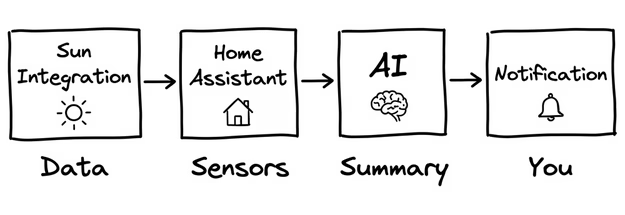
- Every morning → the automation triggers (8:05 AM or at sunrise)
- Reads sun data → sunrise, sunset, dawn, dusk, solar noon, elevation, azimuth
- Sends it to AI → asks for a fun summary with interesting facts
- You get a notification → a friendly briefing on your HA dashboard
Example notification:
“Good morning! The sun rose at 6:42 and will set at 18:35 — that’s almost 12 hours of daylight. Fun fact: sunlight takes 8 minutes and 20 seconds to reach Earth!”
No setup after the first time. No apps to open. Just a daily Sun briefing that makes mornings a little more interesting. ☀️
👉 Two Ways to Get Started with Home Assistant Sun Integration
| Option | Link |
|---|---|
| 🔴 Watch the live build (April 8, 19:00 UTC) | youtube.com/live/T-ZuvpkKjoU |
| 📥 Download the free PDF | automatelike.pro/aisun |
| Both options give you everything you need. The live stream lets you build along and ask questions. The PDF lets you work at your own pace. | |
| Pick one (or both!) and start building. 🚀 |
More AI + Home Assistant Content
If you’re into AI and smart home automations and this Home Assistant Sun Integration is not enough for you, check out these resources: