

The Home Assistant Sun integration is probably the most overlooked thing in your smart home right now.
And I mean that literally — it’s sitting there, in your Home Assistant, already installed, already running, already collecting data about the Sun. Right now. As you read this.
But here’s the thing — until a few weeks ago, I had absolutely no idea what it actually does. I mean, I knew it existed. I’d used sunrise and sunset triggers to turn my lights on and off for years. But that was it. Triggers. On and off.
I never once looked at the actual data.
Table of Contents
The Moment I Got Curious ☀️
It started one warm evening. I was sitting outside with my kid, enjoying one of those sunsets that just goes on and on. And out of nowhere she asked me: “Dad, why is the sun setting so late today?”
I said something like: “Well, because it’s summer and the days are longer.” Which was true… but I realized I couldn’t really explain the details. How much longer exactly? When did the sun actually come up? When will it go down tomorrow? What’s the deal with solar noon?
So later that night I opened Home Assistant, went to Developer Tools, and searched for sun.sun.
What I found kind of blew my mind.
The Home Assistant Sun integration gives you WAY more than just sunrise and sunset times. It tracks dawn, dusk, solar noon, solar midnight, the sun’s elevation above the horizon, the compass direction the sun is facing — there’s like 9 data points in there.
All calculated automatically. Based on YOUR exact home location. Updated in real time.
And I’d been ignoring it for years.
Wait — I Already Have This? 😲
Yes. You do too.
The Home Assistant Sun integration is an internal integration — it comes built in with Home Assistant by default. According to the official analytics, 99.6% of all HA installations are running it. You don’t need to install anything, configure anything, or add any API keys.
It’s just there. Quietly tracking the Sun. Waiting for someone to finally pay attention to it.
And once I started paying attention… I wanted more.
Having the raw data was cool, but reading numbers like “elevation: 42.7 degrees” or “azimuth: 187.3” doesn’t exactly make for exciting morning reading. I wanted something human. Something fun. Something that would make me smile with my coffee.
So I did what I always do — I asked AI to help.
The AI Sun Briefing Idea 🤖
I built a Home Assistant automation that runs every morning. Here’s the basic idea:
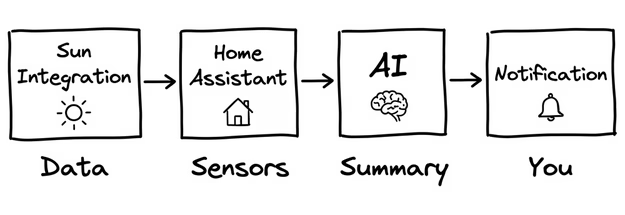
- At 8:05 AM, the automation grabs ALL the Home Assistant Sun integration data
- It sends everything to an AI running through the Ollama-HA app
- The AI writes a short, fun, educational summary — with actual facts about the Sun
- Home Assistant sends that summary as a notification to my dashboard
The result? Something like:
“Good morning! The sun rose at 6:42 and will set at 18:35 — that’s about 12 hours of daylight today. The sun hits its highest point at 12:38. Fun fact: sunlight takes 8 minutes and 20 seconds to travel from the Sun to Earth. So the light you see right now actually left the Sun before your alarm went off!”
No apps to open. No weather websites. Just a friendly, fun morning briefing about the Sun — written by AI, delivered to my dashboard.
And because the AI gets fresh data every day, the facts and insights always match what’s actually happening. In December it might mention the winter solstice. In June it could talk about the longest days of the year. It adapts — and that’s what makes it genuinely enjoyable.
Why the Sun Integration Is More Interesting Than You Think
Here are some things I learned ONLY because the AI started pointing them out to me:
Solar noon is NOT 12:00. The time when the sun is at its highest point depends on where you are within your time zone. For me it’s usually around 12:30–12:40. I had no idea.
Dawn and sunrise are two different things. Dawn is when the sky starts getting light — before the sun actually appears. Same with dusk and sunset. The Home Assistant Sun integration tracks both pairs separately.
The sun’s elevation changes A LOT throughout the year. In summer, the sun gets really high — like 60+ degrees above the horizon. In winter, it barely reaches 25. That’s why winter shadows are so long. The AI taught me that.
Azimuth is like a compass for the sun. 180 means due south, 90 means east. So you can actually see which direction the sun is shining from at any moment. Great for knowing which side of the house gets the most light right now.
I’m honestly a little embarrassed that I had all this data for years and never explored it. But better late than never, right? 😅
What You Need to Build This
Without going into all the details (that’s what the PDF is for!), here’s the basic setup:
The Sun Integration — already installed. No setup needed. The Home Assistant Sun integration just works out of the box.
An AI Task — the Ollama-HA app running in Home Assistant with a cloud or local model. This reads the sun data and writes the summary.
The Automation — a YAML automation that runs every morning, collects the data, sends it to the AI, and delivers the result as a notification.
The automation itself is pretty straightforward — a trigger, one action for the AI, one action for the notification. The interesting part is the AI prompt, where you tell the AI what kind of briefing you want (fun facts, historical trivia, activity suggestions — you can customize it however you like).
📥 Want the Complete Step-by-Step Guide? Get the Free PDF
I put together a detailed PDF guide that walks you through the entire setup.
Here’s what’s inside:
- ✅ How to verify the Home Assistant Sun integration is active
- ✅ All 9 sun data points explained in simple words
- ✅ How to set up the AI Task with the Ollama-HA app
- ✅ The complete automation YAML code
- ✅ How to change the time zone, trigger time, and AI prompt
- ✅ Troubleshooting tips for common issues
- ✅ Recall diagrams that make the concepts click instantly
- ✅ A 10-question quiz to test what you learned 🧠
👉 Download it here: automatelike.pro/aisun
Here’s how it works — enter your name and email on the page. You’ll get a quick confirmation email from me — just click the link to verify you’re a real person and not some AI robot trying to steal Sun facts 🤖☀️. Once confirmed, the PDF goes straight to your inbox.
You’ll also be subscribed to my free newsletter where I share new Home Assistant content, automation ideas, and updates. And right now there’s something special happening — I’m running an AI & Home Assistant Challenge with live lessons that’s exclusive for newsletter subscribers. All the details are shared only in the emails — you literally can’t find them anywhere else. So if you’re into AI and smart homes, you might want to stick around for that. 😉
The newsletter is completely free, and if it’s not your thing — no pressure at all. You can unsubscribe anytime with one single click. No weird forms, no guilt trips, no “are you really sure?” popups. Just clean and simple. 😊
🎥 Don’t Feel Like Reading? Watch the Video Instead
I totally get it — sometimes you just want to see it in action. I made a full YouTube video where I walk through the entire setup, demo the notification live, and explain everything step by step:
You can follow along or just watch and grab the PDF later for the details. Either way works!
The Part I Didn’t Expect
Here’s what surprised me the most — I actually look forward to this notification now.
Every morning, I check it with my coffee. Sometimes the AI tells me about the winter solstice. Other times it mentions that the ancient Egyptians worshipped the sun as a god named Ra. One morning it told my kids that the Sun is about 4.6 billion years old — halfway through its life — and my daughter said, “So it’s like a grown-up?” 😄
It’s one of those automations that sounds silly on paper but actually makes your day a tiny bit more interesting. And isn’t that what smart homes should do?
I Was Always Curious — I Just Never Knew How
Looking back, I think that’s what surprised me the most. I’ve always been curious about the Sun — how the seasons work, why daylight changes, why some sunsets last forever. But I never really dug into it. It felt like something you’d need an astronomy book for.
Turns out, I had all the data sitting in my Home Assistant Sun integration this whole time. I just needed the AI to make it fun and readable.
If you’re the kind of person who likes learning something new every morning — without any effort — this automation is for you. It takes about 10 minutes to set up, costs nothing to run, and once it’s working, you’ll never want to go back.
📥 Ready? Grab the Free PDF
Everything you need is in the guide. The YAML code, the AI setup, the customization tips — all step by step.
Enter your name and email, confirm you’re human, and the full Home Assistant Sun integration guide lands in your inbox in minutes.
Happy automating — and enjoy that sunrise tomorrow! ☀️
P.S. Do you want more AI and HA Articles that I wrote? Check this category!