Moon AI sounds like one of those nerdy experiments you try once and forget. That is exactly what I thought. But after turning this into a small Home Assistant AI flow, I started checking the moon phase almost every evening without even trying.
I have always been curious about the Moon. Not in a scientist way. More like that feeling when the sky looks brighter, the night feels different, and someone says it must be a full moon. I knew the obvious part, full moon vs not full moon, but honestly that was pretty much it. Once I started using this Moon AI approach inside Home Assistant AI, the whole thing finally clicked for me 🌙
This article is not about dumping all the technical details.
All these details are in the free PDF that goes with this – Download the PDF here!
Here, I just want to show you the simple structure, why it is fun, and why this kind of moon phase automation works so well in real life.
Table of Contents
Why Moon AI became interesting to me
The funny part is that the data was always there. Your phone can show the moon phase. Weather apps often include it too. But I never looked for it. That was the real problem. It was passive.
With Moon AI, the information comes to you instead. That changes everything. My Home Assistant AI setup checks the moon data in the evening, gives the context to AI, and turns it into a short fun briefing. Not a boring sensor value. Something readable. Sometimes even something that feels like a mini bedtime story.
That is when the moon phase stopped being random trivia and started becoming part of my evening routine.
The simple structure behind this Home Assistant AI idea
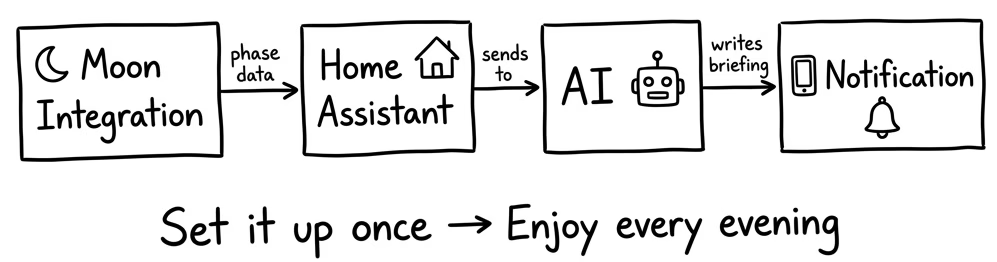
The structure is actually pretty straightforward.
- First, Home Assistant gets the current moon phase from the Moon integration
- Then the automation runs at the right time, usually in the evening or around sunset
- After that, Home Assistant AI sends the moon data plus a little context to an AI prompt
- Finally, the result is delivered as a notification, dashboard card, or voice message
That is the heart of the whole Moon AI idea. Simple data in, smarter text out.
You can make it educational, funny, cozy, myth-based, seasonal, or more scientific. The best part is that the structure stays the same. Only the flavor changes.
What made this moon phase setup stick
I think the reason this works is simple. The moon phase on its own is just a label. Waxing Gibbous. Waning Crescent. Nice words, sure, but not very sticky. Moon AI adds context.
One night you might get a quick explanation of what Waxing means. Another night you might see how far away the next full moon is. Another time the AI might tie the moon phase to a seasonal event or an old myth. Suddenly the same sensor feels alive.
And this is exactly why I like using Home Assistant AI for things like this. It can take small pieces of home data and make them more human.
If you want the full PDF guide
I made a free PDF for this because some things are easier to follow when they are written down properly.
Get the full Home Assistant Moon AI PDF guide here.
Here is how it works. Type your name and e-mail on the page. I will send you a quick confirmation e-mail so you can prove you are a real human and not a robot. After that, the PDF lands in your inbox.
When you grab the PDF, you will also join my free newsletter. That is where I share new content, updates, and right now my exclusive AI and Home Assistant challenge where I share details only in the e-mails. If that sounds useful, great. If not, you can unsubscribe anytime with one click. Easy, clean, no nonsense 🙂
Tired of reading
If you would rather watch than read, here is the video version that inspired this article:
Why this kind of AI automation is worth trying
I like this project because it is not trying to be life changing. It is just smart, fun, and surprisingly memorable. Moon AI takes a tiny piece of data and turns it into something you actually want to read. Home Assistant AI does the boring part in the background. The moon phase becomes part of your evening without asking you to open apps and dig through menus.
That is also why this makes a good template for other automations. Once you understand the pattern, you can reuse it with weather, sun data, energy stats, solar forecast, and more. The formula stays strong.
A quick extra idea
Once you have Moon AI working, it is very tempting to expand it. Add weather context. Add solar data. Add different writing styles. Make it playful. Make it calm. Make it useful for kids. There is a lot you can do with Home Assistant AI once you realize how much personality a simple moon phase briefing can have.
If you want a little extra background on moon observations in general, NASA has plenty of good public resources too, which makes it a nice external reference point for this topic: NASA Moon resources.
Final thoughts
For me, Moon AI started as curiosity and turned into one of those small automations that just makes the smart home feel more alive. It taught me more about the moon phase than years of having the data hidden inside apps. And it made Home Assistant AI feel less like a tech demo and more like something genuinely fun to live with.
If you want the full instructions, the YAML, setup notes, troubleshooting tips, and the rest, grab the free PDF here: automatelike.pro/aimoon.
And if you want more posts like this, check my AI articles here.