

I’ve been looking through AliExpress for Home Assistant gadgets for the 11.11 event. My shortlist has a presence sensor, curtains, a computer, a few DIY parts and a little robot finger. Number eight is my personal favorite, and it’s the one I’ll probably buy because I don’t have a rain sensor yet.
This isn’t a ranking of ten products I’ve tested. It’s a list of things I’d compare for useful projects, with the catches I’d check before paying. First, here are the discount codes so you don’t have to hunt for them halfway down the page.
Table of Contents
AliExpress 11.11 discount codes
Valid until 19 November 2026 at 09:59 GMT+2. These are fixed discounts in US dollars on eligible orders over the stated amount. Shipping restrictions apply to every code below.
OTD1103: US $3 off orders over US $15.
OTD1104: US $4 off orders over US $25.
OTD1111: US $11 off orders over US $65.
OTD1120: US $20 off orders over US $119.
OTD1136: US $36 off orders over US $215.
OTD1153: US $53 off orders over US $315.
OTD1170: US $70 off orders over US $419.
These codes are for other shipping destinations, excluding the country and territory codes listed below. US $ means the currency, not US eligibility. The exclusions include the US, Bulgaria, the UK, Canada and Australia. If your shipping destination is excluded, these aren’t codes for your order.
Excluded shipping destinations (codes exactly as supplied):
RU, AM, AZ, BY, GE, KG, KZ, TJ, TM, UZ, MD, KR, US, BR, ES, PT, PL, UA, CZ, HU, IT, FR, DE, NL, IE, BE, SE, FI, AT, DK, IL, MX, UK, CA, AU, CL, JP, BG, HR, CY, EE, GR, LV, LT, LU, MT, RO, SK, SI, AR, CO, PE, MY, PK, TH, CH, SG, NO, AO, HK, LK, IS, CR, SV, PR, SC, KH, SA, AE, QA, KW, OM, BH, BA, BF, BN, CV, FO, GF, GP, GT, MM, MQ, MU, MV, MW, PF, RE, SRB, VN, ZW, BD, PH, TR, TW, TZ, NP, CI, JO, SN, DO, BO, TN, HN, MG, PY, GN, UG, MZ, ZM, UY, RW, NI, AL, MK, BW, PG, GQ, ME, NC, AW.
Paste the eligible code at checkout, click Apply, and check that the discount appears before payment. The checkout result decides whether it applies to your selected items and destination. I haven’t independently tested these codes or confirmed a sale price for every version in the links below.
The product links in this article are affiliate links. If you buy through them, I may earn a commission at no additional cost to you.
How I choose Home Assistant gadgets before a sale
I start with a job, not a discount percentage. Do I want the lights to stay on while I read? A warning before a water tank runs dry? Curtains that close when the sun hits the room? That question makes it much easier to leave an interesting but unnecessary gadget in the cart.
The other thing I check is the whole cost. A curtain motor without its track, or a cheap button pusher without a compatible gateway, can be an unfinished project rather than a bargain. Home Assistant gadgets can also hide several different products behind one photo. The selected option matters more than the longest title.
Tired of reading?
Watch the video version here: https://youtu.be/QV39vJqYGqo
I go through the same ten picks in the same order, including what I would check on the product pages. Below, I explain which job each one could do and where the extra parts come in.
1. SONOFF SNZB-06P24: presence when you sit still
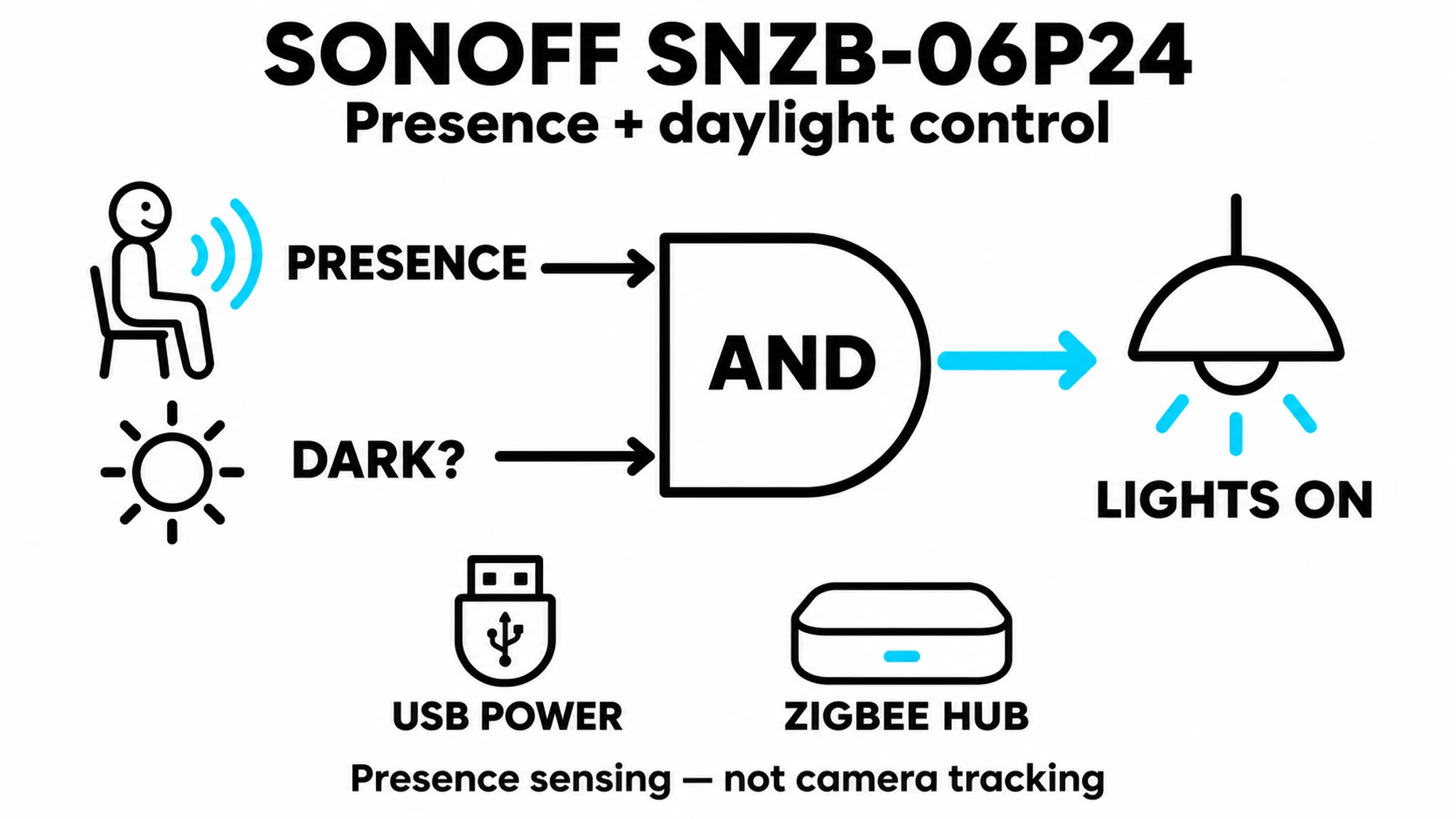
The SONOFF SNZB-06P24 is for the room where the lights go off while you’re still sitting there. A basic motion sensor may stop noticing you when you settle down with a book. This model uses 24 GHz radar for presence and also reports light, so an automation can consider whether someone is there and whether the room is dark.
There is an exact-model Zigbee2MQTT device page. That is much more useful than a broad claim that a seller’s Home Assistant gadgets are all compatible. You still need power and a working Zigbee setup, and placement will affect how useful the readings are in your room.
The Apple Home wording in the listing refers to a Matter bridge. The sensor itself is Zigbee, not a Thread sensor. Also check the full model name: SNZB-06P24 and the older SNZB-06P aren’t interchangeable names.
SONOFF SNZB-06P24 on AliExpress (affiliate link).
2. Zemismart curtain motor: measure before buying
This Zemismart listing is for a Matter-over-Thread curtain motor with a spliceable track. I like the simple result: curtains that open in the morning or close when direct sun makes the room uncomfortable. It’s a physical upgrade you can see, without asking anyone to open a dashboard.
But a motor and a complete curtain setup aren’t always the same purchase. Measure the window and check the track length, mounting parts, power requirements and exactly what comes in the selected kit. A low price for the motor alone doesn’t tell you the finished price.
Among these Home Assistant gadgets, this one also needs a different connection path from Zigbee. The Matter-over-Thread version needs a Thread border router and a suitable Matter setup. A Zigbee coordinator alone does not provide that. The Home Assistant Matter documentation explains the distinction before you buy hardware around the wrong assumption.
Zemismart curtain motor and track on AliExpress (affiliate link).
3. Portable Intel mini PC: buy the configuration you need
The mini PC listing mixes i9-10980HK, i9-8950HK and i3-6100U options. Those names shouldn’t be treated as one specification. I’d check the processor, memory and storage on the actual selected configuration, along with the power supply and what is included.
A computer could run Home Assistant and connect the sensing and control jobs in this list. But you don’t need a Core i9 just to turn on a light. If the host you already have is reliable and has enough room for your plans, keeping it may be the best purchase decision.
Some Home Assistant gadgets are components of the system rather than things you pair with it. This is one of them. Home Assistant OS has a generic x86-64 installation route, but that is not certification of this seller’s computer. Check the hardware and boot requirements. Installation and configuration are still part of the project.
Portable Intel mini PC on AliExpress (affiliate link).
4. MOES Zigbee knob: give the lamp a proper control
A wireless knob could be a better upgrade than another screen. I’d use one beside a bed or sofa, where someone should be able to dim a lamp without finding a phone. Turn for brightness, press for a scene, if the exact version sends the actions you need.
This is a battery-powered scene controller, not a mains dimmer that powers the light itself. Home Assistant or another supported system must turn its actions into commands for the lamp. That difference matters if you’re expecting it to work as a normal wired dimmer.
I like Home Assistant gadgets that other people can use without learning my dashboard. Before buying this one, I’d match its exact model to a supported-device entry and check the turn, press and hold actions. A Zigbee2MQTT mention in the title is a useful lead, but it doesn’t establish every event for every knob sold on the page.
MOES Zigbee knob on AliExpress (affiliate link).
5. XKC-Y25-V: a warning at one water level
The Keyestudio XKC-Y25-V is a DIY component. It mounts outside a suitable non-metal container and detects whether liquid reaches that height. Think of a low-water warning line on a reservoir. One sensor at one height doesn’t continuously tell you the tank’s percentage.
I have an XKC-Y25 liquid-sensor video and a matching project article. My build uses the PNP version. That is not proof that the Y25-V option in this listing has the same output or can use the same wiring.
Unlike ready-to-pair Home Assistant gadgets, this needs a suitable controller, such as an ESP board running ESPHome, plus wiring matched to the actual sensor. Check the supply and output levels before connecting it. A sensor’s allowed supply voltage is not automatically a safe voltage for an ESP input. I’d use the tutorial to understand the project, then match the parts carefully.
Keyestudio XKC-Y25-V on AliExpress (affiliate link).
6. Ultrasonic module: estimate the level across a tank
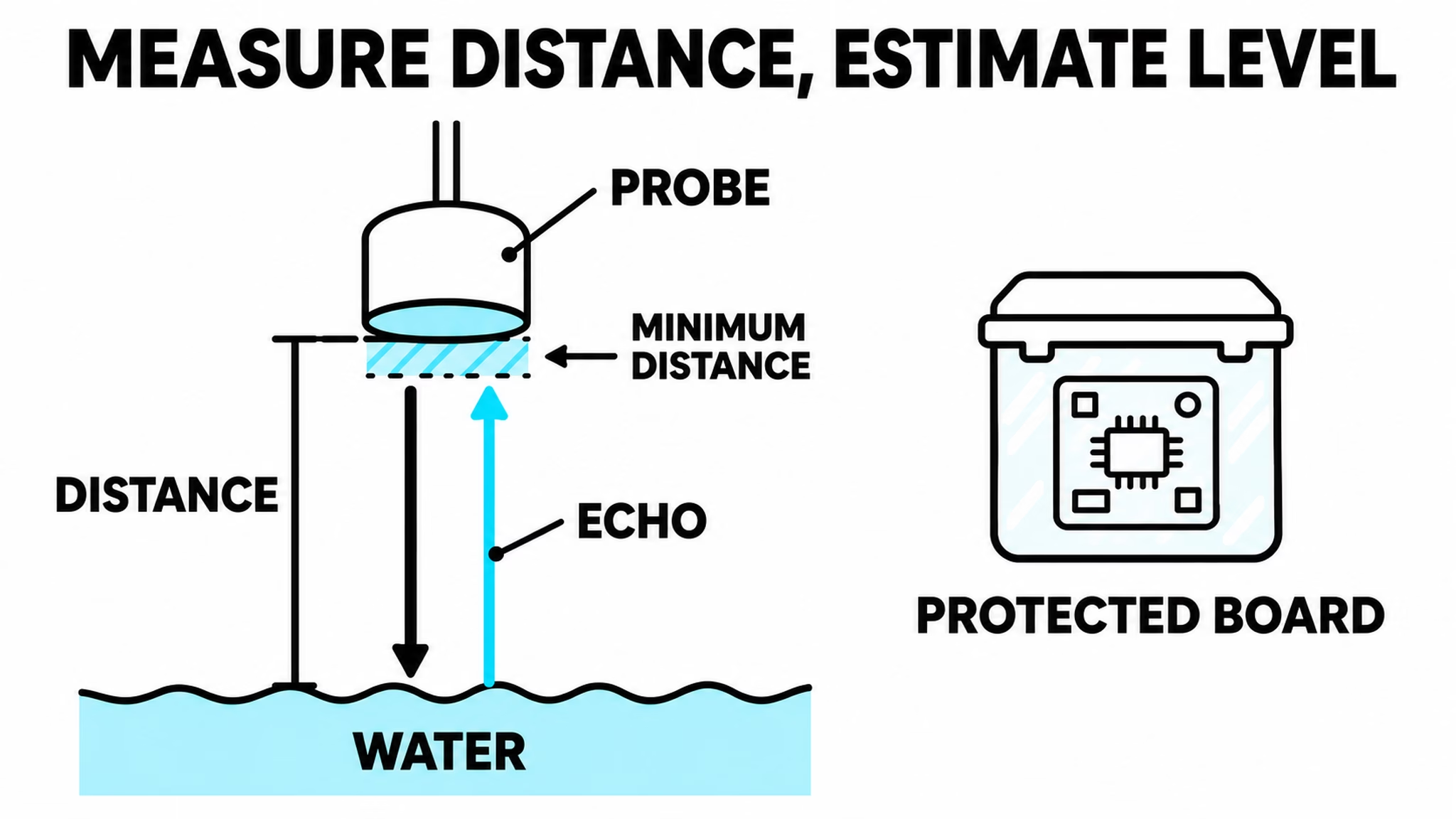
The JSN-SR04T / AJ-SR04M listing takes a different approach. A probe above the water measures the distance down to the surface. With the tank’s dimensions and calibration, that air gap can become a level estimate. The previous sensor watches one line; this project can follow a changing level.
My waterproof ultrasonic distance-sensor video and companion article use an AJ-SR04M build. The mixed listing is not a promise that every JSN or AJ board has identical wiring or the same operating mode. Match your ESPHome setup and electrical interface to the board you receive.
For DIY Home Assistant gadgets like this, mounting is part of the measurement. Check the minimum measuring distance so the probe has enough space above the highest water level. Keep the exposed controller board protected outside the tank. A waterproof probe doesn’t make the circuit board waterproof. Test the readings before using them for anything beyond a notification.
JSN-SR04T / AJ-SR04M module on AliExpress (affiliate link).
7. Tuya mini relay: check the circuit, not just the amps
This small Zigbee relay could add control behind an ordinary wall switch, if the wiring and box are suitable. The result I’d want is simple: control from Home Assistant while keeping a useful physical switch for everyone else.
The listing mixes one, two and three channels, plus 10 A and 16 A options. Those are different versions. Check the exact Zigbee model, its wiring diagram, whether it needs a neutral wire and how much space it leaves behind the switch. Also find out how the connected wall switch behaves.
Mains-powered Home Assistant gadgets need a check of the load type as well as the current rating. A number in the title is not permission to connect any lamp or motor up to that number. Have a qualified electrician handle the mains wiring. I’d rather save money by choosing the right module than find out later that the cheapest option doesn’t suit the circuit.
Tuya Zigbee mini relay on AliExpress (affiliate link).
8. Outdoor rain detector: my personal favorite
This is my favorite of the ten. I don’t have a rain sensor yet, and I’ll probably buy this one myself. The first job would be a notification when it starts raining. Later, I could decide whether that signal belongs in a window or watering routine.
A rain detector answers a different question from a soil-moisture sensor. One reports what is happening outside now; the other tells you about the conditions around a plant. I’d choose based on the decision I want the automation to help with.
The listing mentions Zigbee and Wi-Fi, and advertises IP65. I’d investigate the Zigbee version first, then match the exact model to its supported-device entry. Wi-Fi wording alone doesn’t tell me which Home Assistant connection is available. I haven’t tested this sensor’s response or reliability. Even favorite Home Assistant gadgets have to earn trust, so my first automation would report rain, not immediately control something important.
Outdoor rain detector on AliExpress (affiliate link).
9. Remote button pusher: first, identify the signal
This little actuator physically presses an existing button. It could be a fun way to add control without opening the appliance, provided the mount fits and the rod can reach far enough. A robot finger is less impressive when it misses the button.
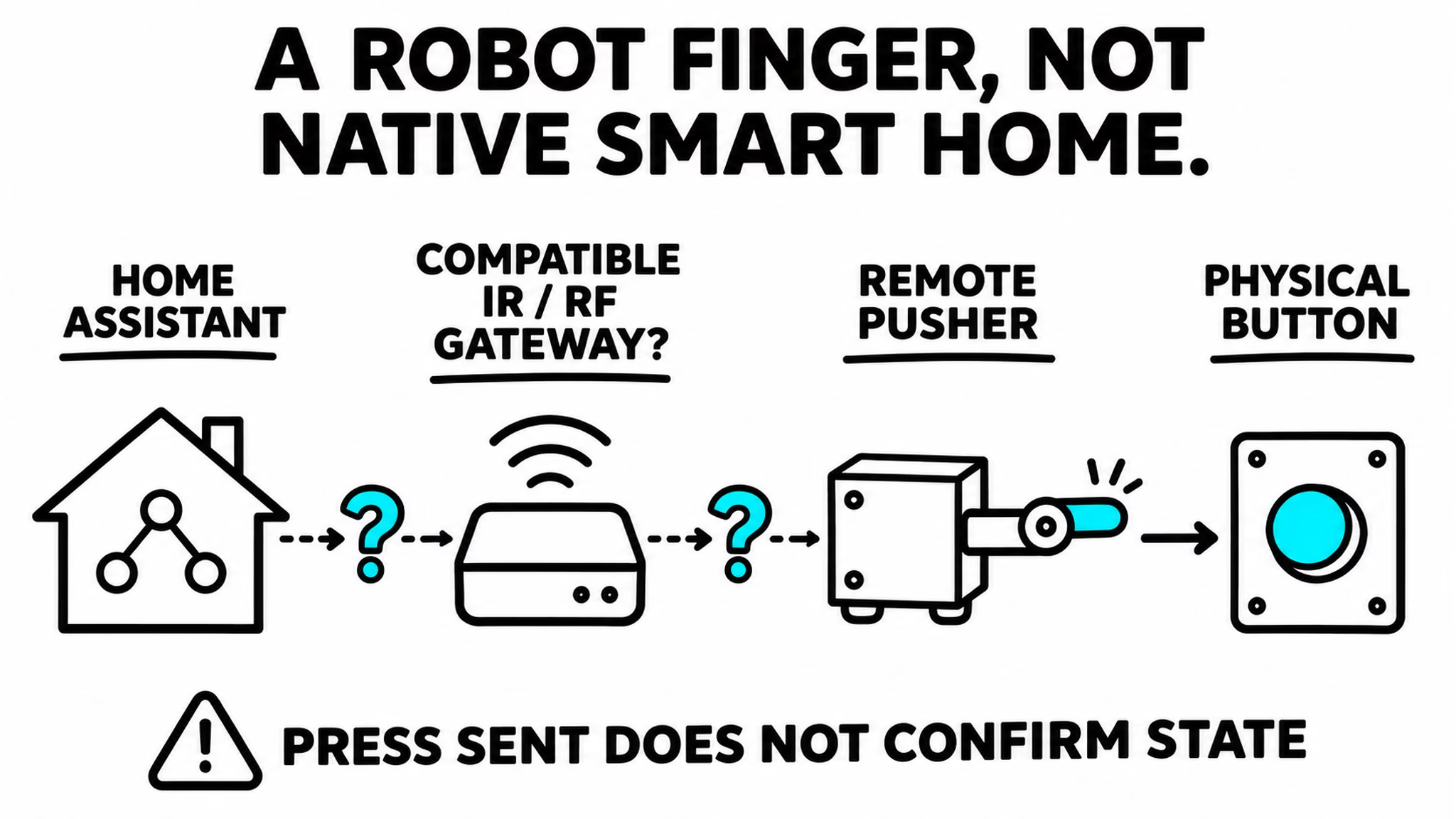
The possible Home Assistant route is a gateway that can reproduce its remote command. But the listing title doesn’t establish whether the actual remote uses infrared or radio frequency. An IR-only gateway cannot send an RF command. For RF, the frequency and command format must also match supported hardware.
The Home Assistant Broadlink integration is one possible route with suitable IR/RF hardware. It is not proof that this particular pusher works with it. When comparing these Home Assistant gadgets, include the gateway in the total cost. Also remember that sending a press does not confirm whether the appliance is now on or off.
Remote button pusher on AliExpress (affiliate link).
10. Motion or presence: choose the actual sensor
The last listing has options labeled Motion sensor(Z2M), Lux TH Presence(Z2M), Presence sensor(Z2M) and Presence with Stand(Z2M). The main question is which one you are actually buying. The cheapest selector option is not automatically every feature shown in the photos.
For a hallway, detecting someone walking past may be enough. At a desk, I’d investigate a presence model that can notice someone sitting still. If the lights should depend on daylight, check that the chosen version exposes a useful light reading. Don’t assume temperature and humidity from a photo of another option.
Match the exact model to its Zigbee2MQTT device page, then compare power and mounting. A stand can make placement easier, but it doesn’t change the protocol. This brings me back to the first of these Home Assistant gadgets: buy the sensing job your room needs, not the longest feature list.
Motion and presence sensor options on AliExpress (affiliate link).
A free PDF for the unfamiliar smart-home words
If Zigbee, Thread and Matter are starting to sound like three extra things in your shopping cart, get my free Home Assistant glossary. It is a PDF packed with Home Assistant words, acronyms, and their simple, useful explanations. It can help you read a listing without treating every logo as the same connection.
To get the PDF, type your name and e-mail. You will receive an e-mail from me to confirm you are not a robot, and the PDF will be sent to your inbox. You’ll also be subscribed to my newsletter where I share new content, updates, and my exclusive AI and HA challenge. It’s free and you can unsubscribe anytime with one click.
Give the new gadget a useful job
Before checkout, choose the job, check the exact version and add any missing controller, gateway, track or power supply to the cost. Compare the delivered price with a trustworthy local option. Then apply an eligible coupon and look at the actual total. A discount doesn’t make an unfinished project useful.
If the gadget arrives before you’ve thought of an automation, my Home Assistant AI Recipes book can help with the useful part. Your new sensor deserves a better job than reporting to a dashboard nobody opens.
If you want more
Browse my Home Assistant articles, or start with the non-contact liquid-sensor project and the ultrasonic water-level project. Those are two different ways to answer a useful question before buying more hardware.